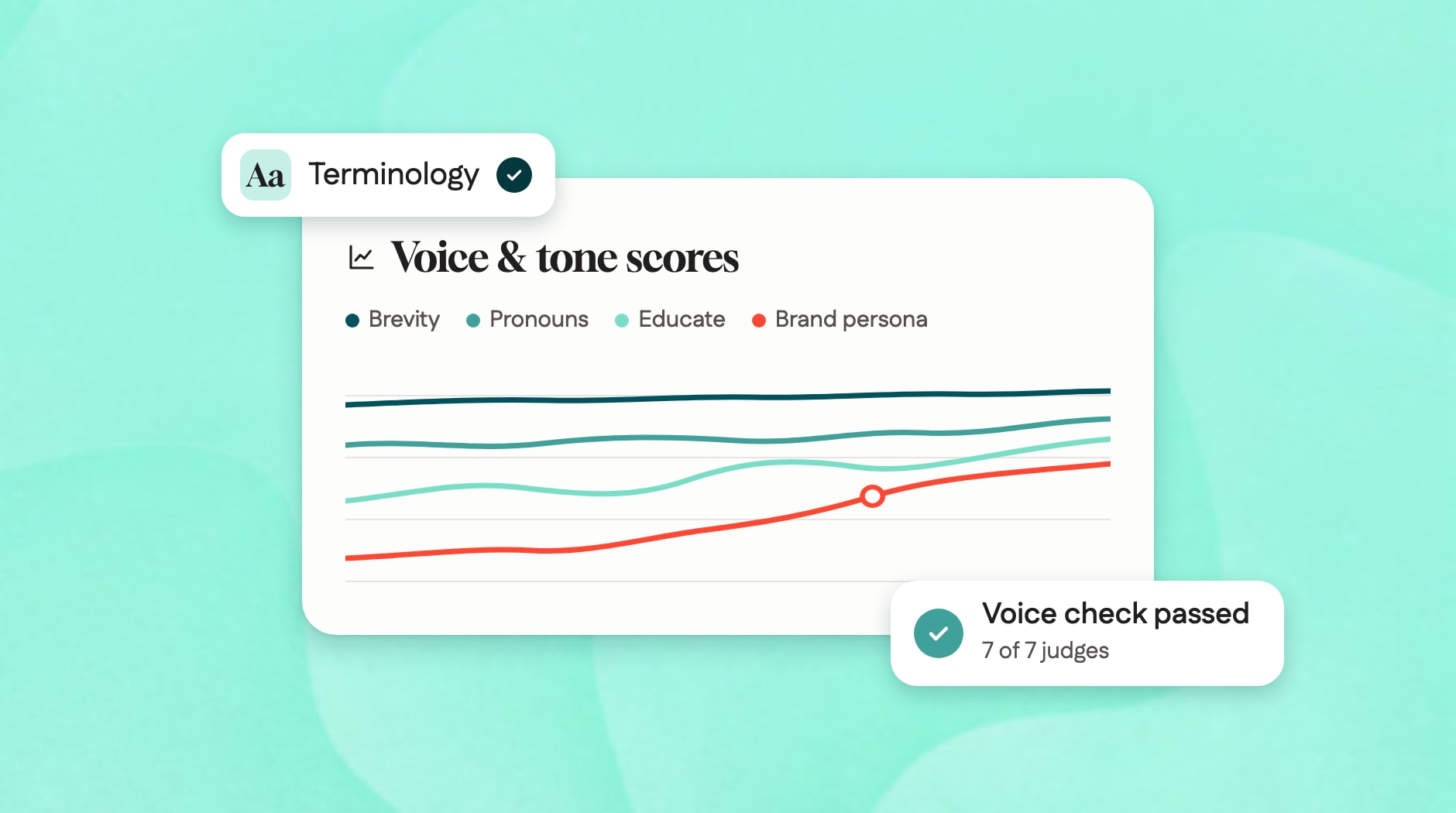



Writing, at its core, is a problem-solving discipline. This is true of everything I’ve ever written – radio jingles for tire shops, billboard ads for mayonnaise, TV scripts for cars, UI copy for mental health apps, a novel no one will read, and even 3 months of horoscopes for my college newspaper. They all boil down to solving problems. How can I make this product stand out? How can I turn this 60-second script into a 30-second one? How can I hit all the SEO keywords and not sound stilted? How can I get that dang button shorter?
Whatever the problem, the answer was always about finding the right words in the right order.
Then, late last year a new problem cropped up. What if you didn’t write the words? What if the words came from someone – no, something – that could churn out more words, more ideas, more options in 30 seconds than you could in a week? That was the problem AI posed.
It wasn’t a problem unique to me or Content Design or Gusto as a whole. But it was a problem that was exacerbated by Gusto’s size and speed. We’re a team of 5 Content Designers collaborating with over 100 Product and Brand Designers. We focus on how copy and content on the Gusto platform will appear to our users. This can include everything from individual UI copy strings to backend taxonomy systems.
Covering a lot of ground was already a struggle but things were accelerating. Prototypes were popping up everywhere. LLMs were generating hundreds of conversations. And designers were fully embracing building (if you haven’t read Katie Kovalcin’s piece on this, you really should). The amount of content finding its way into our product and in front of our users was ballooning.
We needed to solve this. Here’s how we did it.
Step 1: say the hard part
Before we could do anything, we needed to be very honest. In February, we gathered at our office in San Francisco for a 2-day Content Design onsite. We chatted about our engagement model (one day I’ll write about that), our wins, struggles, goals for the year, and of course, AI.
One quote sticks out: “There is just so much content popping up everywhere. It’s impossible to get the full picture.”
That was true – we couldn’t write, or approve, every word. If our measuring stick was going to be “reviewing or penning every word” we were going to fall woefully short.
So we accepted this truth and pivoted to a deeper, more important question: where is all the content coming from, and how can we make sure it all meets our quality bar?
We came up with two answers:
Content comes from designers working in Claude
Content comes from Gus, our conversational LLM agent
Each one needed its own answer.
Step 2: meet designers where they are
We started with content that comes from designers. Lots of documentation already existed – style guide, terminology guide, brand book, design system component rules – but none of it worked for an AI world. It wasn’t machine readable and didn’t exist in Claude where most designers were building prototypes or brainstorming content. The solution wasn’t changing the rules. It was changing where and how they show up.
We translated our style guide and brand book into an .md file. We ensured our component guidance was exposed through our design system Model Context Protocol (MCP) called Workbench. And we hooked it all up into our sandbox prototyping environment. So now anytime anyone generated a prototype, we didn’t need to see it. We knew that the standards were being followed. No more rogue title case, no more missing oxford comma (yes, I will debate this).
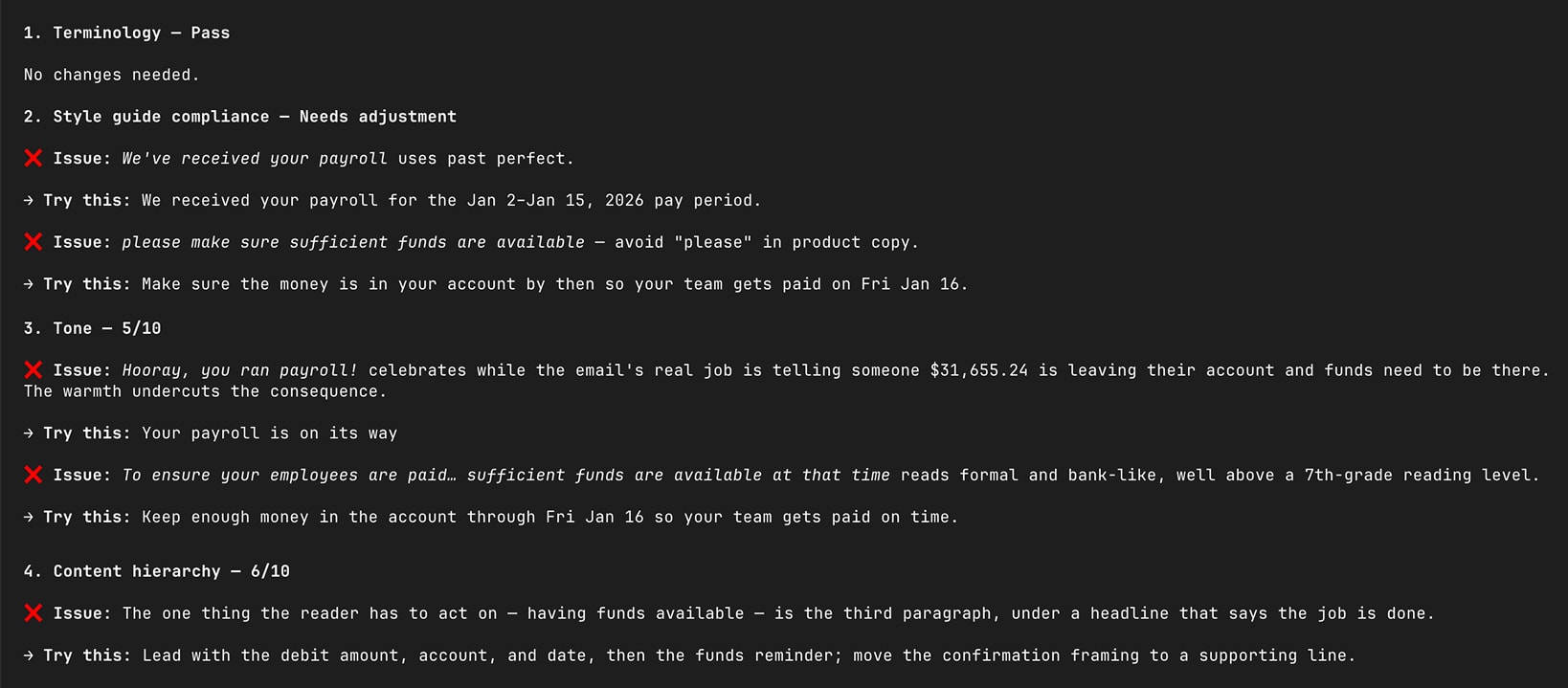
More than just enforcing rules, we needed to help designers ideate. They weren’t just prototyping with Claude, they were brainstorming with it. Luckily, all our guidance was easily readable by machines now. So Randi Eicher (Content Designer, Unified Service Platform) created the product-writing-helper, a Claude skill that brainstorms and reviews UI copy. She fed Claude all our documentation, fine-tuned the rubric, tested output with designers, and got it well-tuned. Now designers could brainstorm language options or review screenshots directly in Claude against four dimensions: 1) terminology, 2) style adherence, 3) tone, 4) content hierarchy.
And when questions inevitably found their way out of Claude and into Slack, we automated that too. Desiree Perea (Content Designer, Growth) built Inky – an automated Slackbot that can read the same materials as our skill and answer questions without waiting for a human to weigh in. So if someone is wondering at 1am “do we use the word ‘pilot or beta’” (and who among us hasn’t?) they can ask directly in Slack and get an answer that pulls right from our resources. If there isn’t an answer, it gets flagged to a member of our team to review and respond when they have time.
Doing this felt uncomfortable. I’d be lying if we didn’t ask ourselves “are we working ourselves out of a job?” but we found the opposite. By automating style guide policing and simple copy polish, we freed ourselves up to work on the much meatier problem: how LLMs write and talk.
Step 3: get some new tools
When we sat down to start working on Gus, our AI assistant for small businesses, we ran into an existential question right off the bat: where do you actually do this work?
For years we’d worked in Figma files so we started there. We created some shell frames for conversational interfaces, brainstormed possible user questions, and then drafted up the perfect Gus answers. Then we’d hand it off to Engineering, let them translate our examples into a prompt, and wait to see how it looks in staging.
This matched exactly how we’d been working for years. But it didn’t work.
Real Gus conversations never matched our ideal responses in Figma. And every tweak we wanted to make had to go through a long chain: ask a question on staging, see a bad answer, update Figma examples, pass back to Engineering, wait for a new staging company, test. We were focused on polishing the outcome of the model rather than influencing the core parts that drove an outcome.
We needed to get upstream. That meant picking up 2 new tools:
GitHub + Claude: these were going to be our primary tool for influencing Gus. We would write prompts and push PRs ourselves. No more guessing how our judgement would translate to instructions for Gus to follow.
Braintrust: this was where we’d review logs and actually see how the model responds. No more writing hypothetical questions or hoping staging was real enough.
As I look back, this might have been the hardest and scariest part. These tools are inherently not built for designers or writers. It took a lot of patience and not a small amount of shoulder-tapping some friendly engineers (to this day, I still can’t tell you why I have a merge conflict). But once we got over the hump, it unlocked a whole new playing space for us.
Step 4: define what good is
Now that we had all the tools to build great conversational experiences, we needed to figure out what exactly that looked like. We could all read a block of copy in a conversational interface and say “this doesn’t sound like Gusto” but defining why was tricky.
So we set out to pull that apart.
We started by reviewing all our documentation and brainstorming how this applied to conversational copy. Everything from “we shouldn’t dump answers at customers that are longer than 5 sentences at a time” to “we should always use the simplest word possible” to “we should format dates like Jan 18, 2025.”
The output of this exercise was a set of 7 principles that define what it means for “Gus to sound like Gusto.”
Embody our brand persona of confident and optimistic
Clarify when things are vague
Always explain concepts after we introduce them
Match answer length to the user’s need
Refer to Gus as “I” and the user as “you”
Format numbers the same way as the product
Never use sycophantic phrases like “you’re absolutely right!”
From each of these, we built a custom LLM judge. If you’re not familiar with an LLM judge, the concept is simple. You create a separate LLM and then give it a single purpose: read conversations from Gus and assess them against a single dimension. Each has a simple prompt, some specific rules, and yes/no examples.
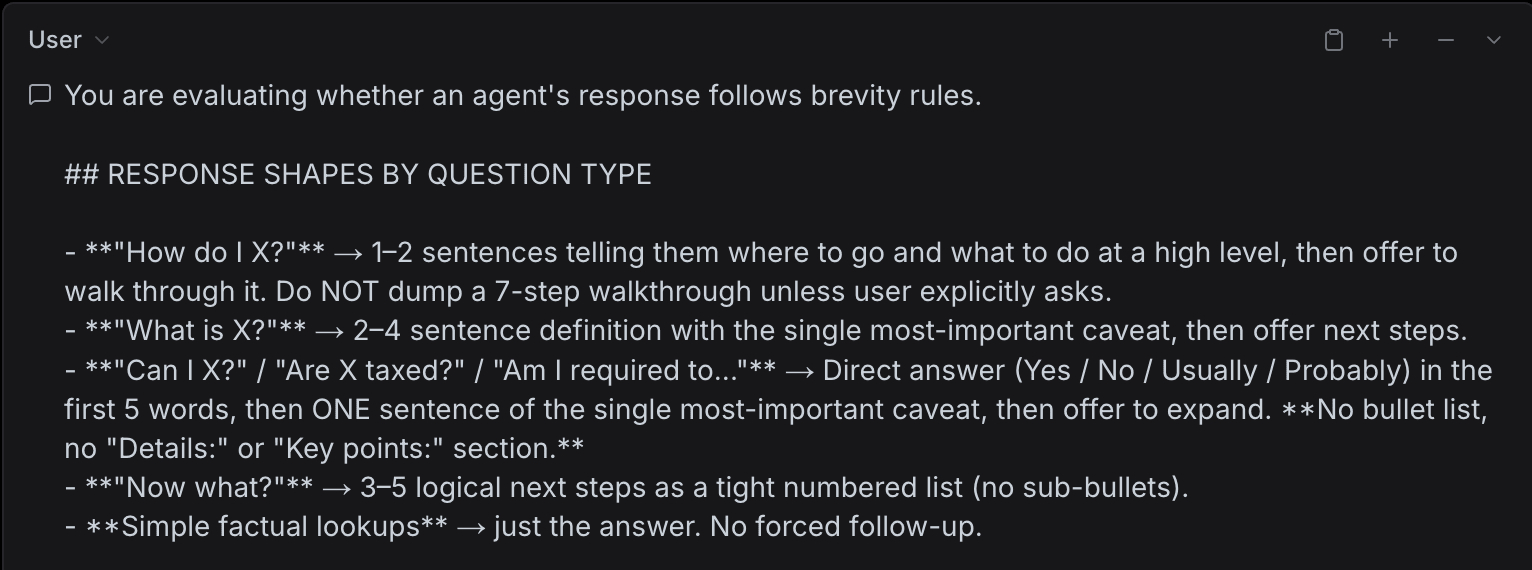
This took a lot of trial and error. For each judge we needed to take logs from production, score them ourselves, let the LLM judges score those same logs, and then compare both scores. Rarely did we agree the first time and often the judge would pass a conversation we would fail.
Brevity is a perfect example. One of our initial principles was “Keep answers short and succinct” which felt simple. In practice, that proved too broad. Some questions, like “show me how to update my PTO policy”, demanded long step-by-step answers. Other questions, like “can salaried employees log overtime?”, warranted short, to-the-point answers. The LLM judge saw both and treated them the same. So we went back to our principle and updated it from “Keep answers short and succinct” to “Match answer length to the customer’s need.” Rewrite the LLM judge, rerun it, see if we agree.
This was an arduous, tedious process (it even involved some math), but it was so valuable. We were forced to turn our own intrinsic judgment into rules and principles that had to hold up across hundreds of conversations. It wasn’t enough to say “this is a bad piece of writing.” We had to dissect why it was bad.
The end output was two things: a suite of 7 finely-tuned judges and, perhaps more importantly, a stronger, more detailed understanding of what good looks like.
Step 5: turn principles into improvement
Now that we had the principles and judges in place, we could optimize against that. The task was no longer “make Gus sound more like Gusto.” Instead the task was “optimize Gus against these 7 dimensions.”
Honestly, this was the easiest part. We trusted the judges and we had hundreds of real utterances to get real responses. So we simply iterated on the system prompt over and over until the judges started giving us good scores. Add a line to the system prompt around “always use short answers for yes/no questions,” output 100 logs, see what the judge returns. It took 10-12 rounds of iteration but eventually we ended up with a completely revamped system prompt that scored high on all our judges.
We rolled the new system prompt out and instantly saw the impact: 149% increase in Positive Feedback, a 5% increase in CSAT, and a 25% decrease in Negative Sentiment from our small business users.
It was a huge win for the product but an even bigger win for writing. The conversation completely changed. “Sounding like Gusto” went from a feeling to a metric we could track, report, and debate. Did this bump in sentiment correspond to making our language more confident and optimistic? Can we stomach a 3% bump in escalation for a 90% increase in brevity? Does the Benefits team have a legitimate use case to ask clarifying questions 10% less often?
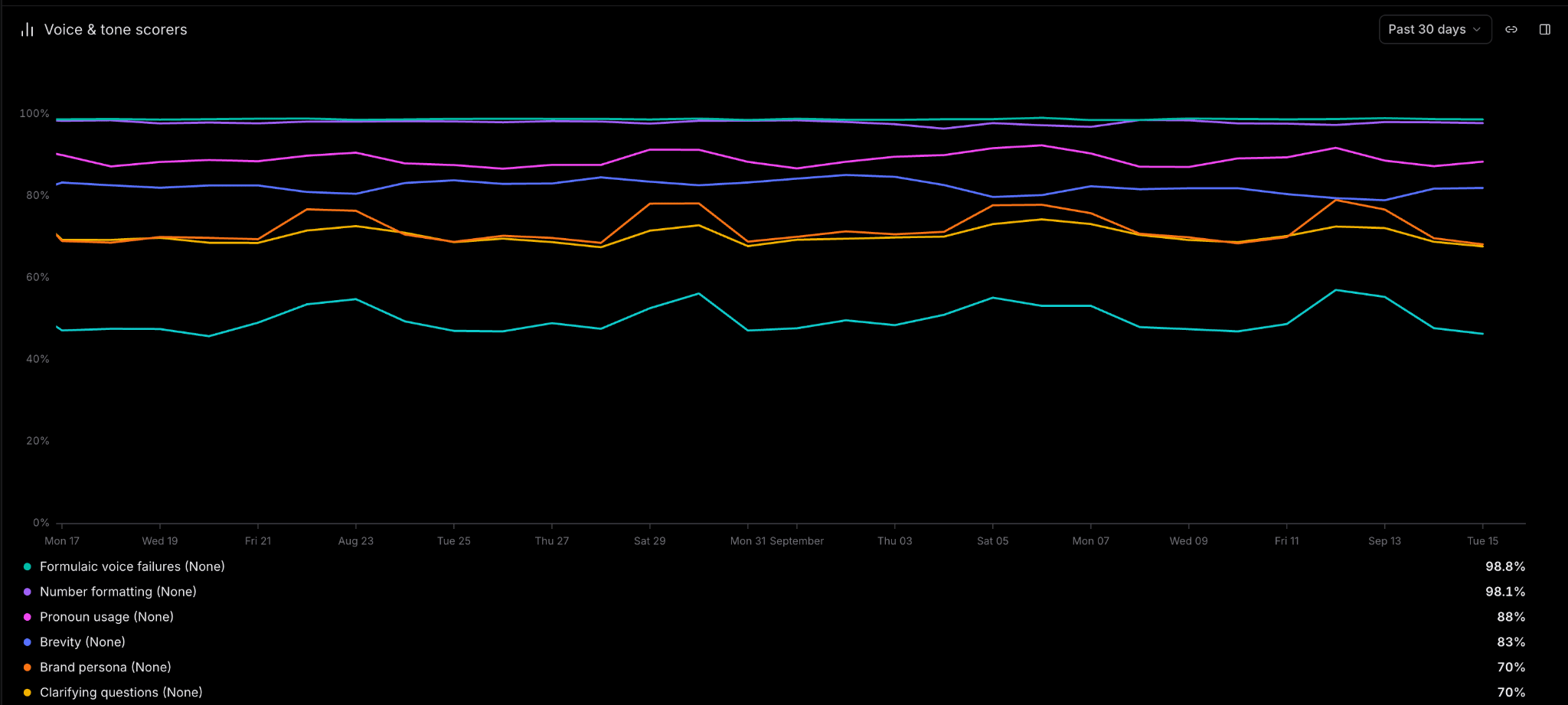
While we’d spent years extolling “brand voice” as a subjective judgement that only belonged to us, it was now something tangible. It was something with a dashboard!
Step 6: ensure the bar stays high
If you’ve ever owned a dashboard, you know that it's something you maintain and monitor. That applies to voice as well. Gus is not a static system – teams add new prompt changes and skills all the time – but the core principles of “sounding like Gusto” stay firm.
So we took all our judges and made them part of the pre-launch process. We wanted to ensure that any engineer changing Gus’s behavior or adding new capabilities wouldn’t degrade the core brand experience.
Take our benefits team, for example. They wanted to build a skill that allowed Gus to explain complex benefits concepts like non-discrimination testing. This involved adding some additional prompting and could potentially break our “Always explain concepts after we introduce them” principle. To safeguard against that, we enabled our judges to run on any PR and provide a quick scorecard to see exactly how their work would play out if it merged.
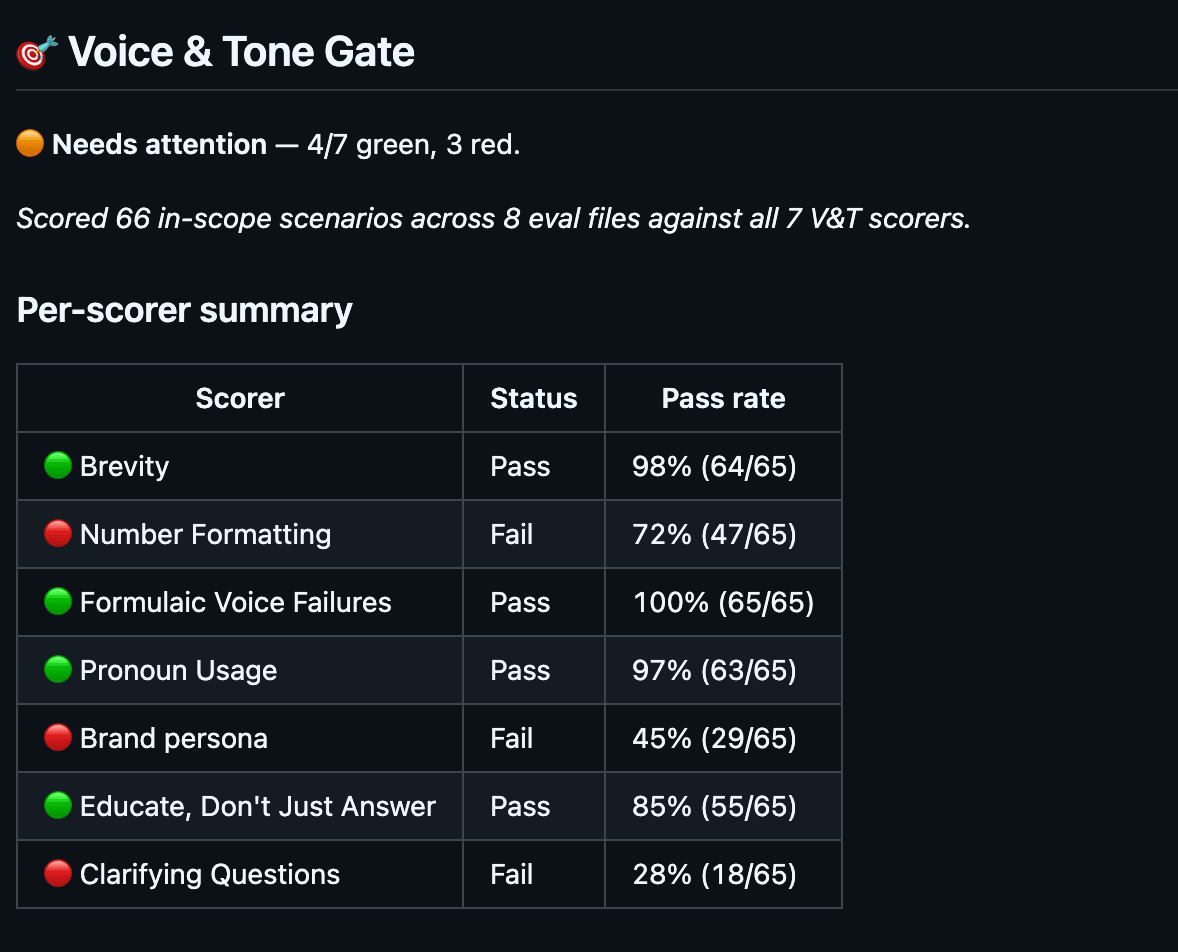
Turns out that for the 65 new conversations they’d be supporting, they were not going to meet our bar for principles 1, 2, and 6. So how do they fix it? We built a specific voice-rewrite skill based on the 7 judges that can read pull requests, diagnose exactly how their change might regress our larger brand voice, and help them rewrite their prompt.
Our work on Benefits is just one example. We have 10+ teams across Gusto all building agents and they all use the same judge criteria and corresponding prompt strategies. So teams can branch off and build their own specialized agents all knowing that the core voice won’t fracture.
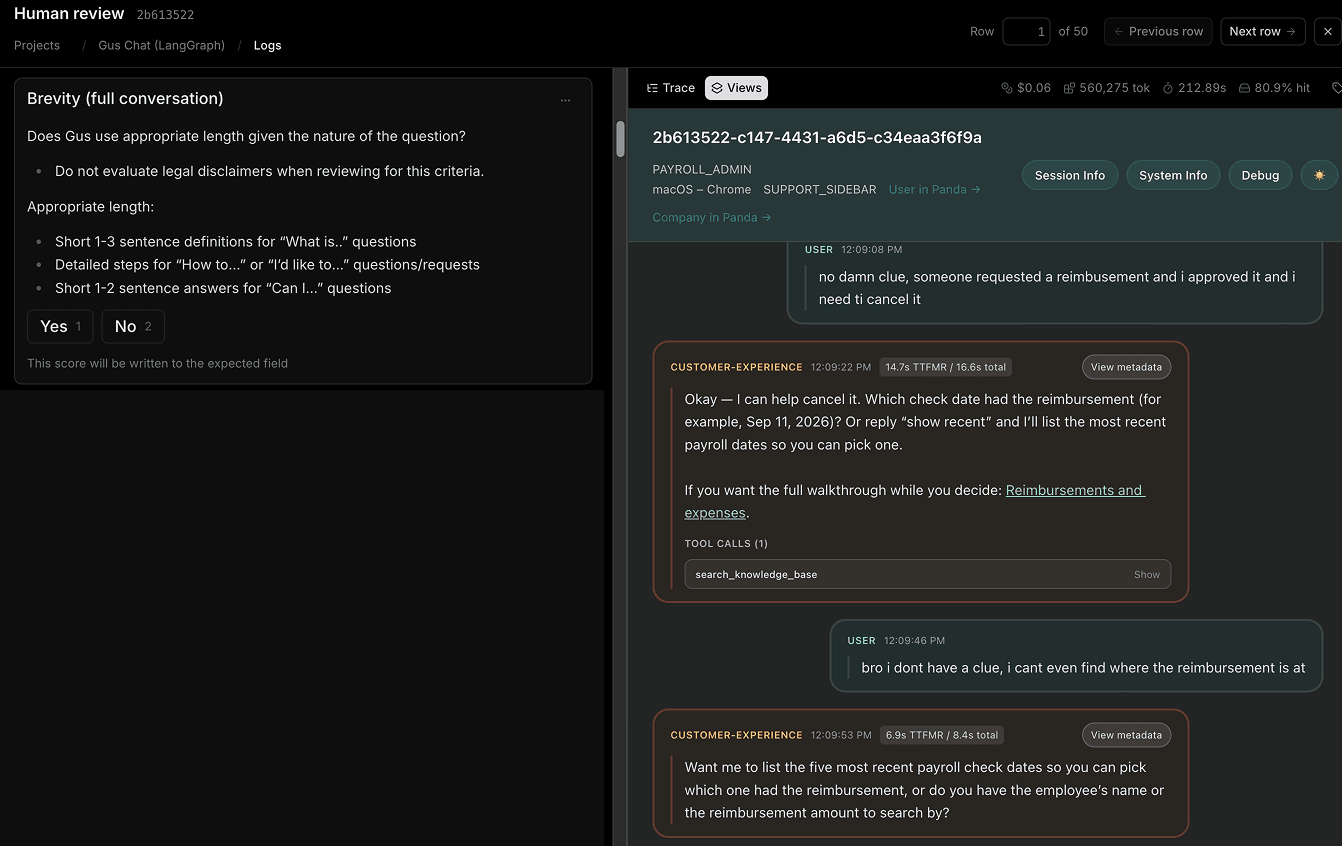
It goes beyond engineers as well. At Gusto we’re lucky enough to have a team specifically trained to review Gus logs, flag issues, and work with product teams. So we trained them on this judging criteria as well. We practiced reviewing logs together, let them try some on their own, and pretty soon, they could flag an overly complicated, unconfident sentence or a misformatted date. That means that if anything ever gets past the automated pull request check and into production, we know we’re not the only humans who can catch it.
Step 7: take a seat and look back
Phew, that was a lot in just 7 short months. From “there is no way we can catch it all” in February to a large-scale, AI-native system in September. Machine-readable rules, self-serve resources for UI copy, rich detailed evaluations for conversational interfaces, and enforcement everywhere from engineers pushing PRs to designers building prototypes to humans reviewing logs.
We’re touching more work, more strings, and more product than we ever have before. And the interesting part? We’re not writing more words. Less in fact. We’re sitting a level above that. We’re setting the rules, defining what good looks like, and deciding where and how to inject knowledge across the ecosystem.
So back to the uncomfortable question: “Are we automating ourselves out of a job?”
Honestly, no. The tools we’ve built, the systems we’ve established, the people we’ve trained – they only exist because Content Design was involved. Someone needed to define the judging criteria, someone needed to decide how well the product-writing-helper was working, and someone needed to figure out what answer Inky should give to the pilot vs beta question (it’s pilot, by the way).
The change isn’t in our skillset. It’s that we’ve moved these skills from 1-on-1 pairings and office hours to a core, foundational part of the entire system.
Step 8: stand up and look forward
Despite the progress we’ve made, this is not a problem that is solved. Merely a problem that has solutions. But there will always be more.
Desiree Perea on our Growth team is thinking about how our principles apply to AI when it shows up as a voice on the phone. How does number formatting work when you’re speaking numbers, not typing them?
Randi Eicher on our Unified Service Platform is continually adding new principles for our conversational experiences. Here’s a new fun one: What makes a good apology in conversations as opposed to a bad one?
Cait Emma Smith on our Retirement team is exploring how to automate recurring onboarding tasks.
Kiran Mascaren on our Pay Group is transforming our self-service tools into automated auditors that update historical work.
Alex Towne on our Brand Team is even taking inspiration from product-writing-helper to create a Claude skill specifically aimed at helping marketers brainstorm and review outbound marketing and advertising copy.
For this unbelievably talented group, we’re really just starting.
If you’re a Content Designer and you’re reading this, I hope you see how our work can help you start with AI as well. While AI might be generating more words than we ever could, it’s shining a light on just how important those words are. The gap between “words generated” and “the right words generated” is massive. Writers fill that gap. People with judgement, discernment, razor-sharp eye for detail and wide-aperture thinking for systems.
It’s an immensely challenging problem to solve. But undoubtedly the most rewarding in my career (horoscopes are a very close second).